
Dipsy Dolphin is a playful Windows desktop assistant inspired by theatrical retro companions like BonziBuddy, but rebuilt with a much stricter runtime boundary. The goal was never to make an invisible automation daemon. The goal was to make a visibly alive character that lives on the desktop, responds with personality, and can still perform useful actions without collapsing into opaque behavior.
The deeper reason I built it was to find out what local LLMs could actually do when they were placed inside a product with real constraints. I was less interested in benchmarking prompts in isolation and more interested in a concrete question: if the model is running locally, on a real Windows machine, behind a visible character interface, how useful can it become before the experience starts feeling unreliable, vague, or fake?
That question shaped the entire project. Dipsy is not just “an AI character” for novelty. It is a testbed for local inference, structured responses, constrained actions, and desktop UX. I wanted to see whether a local model could drive a companion that felt lively enough to be fun, coherent enough to be believable, and bounded enough to trust.
What makes the project especially interesting to me is the tension between charm and control. Dipsy is meant to feel expressive, impulsive, and character-driven, but the actual system has to stay legible. That tension shaped almost every design decision: local model inference instead of a remote black box, structured output instead of freeform execution, explicit runtime interfaces instead of hidden side effects, and a UI layer that stays separate from the controller and action system.
Product vision and design constraints
I framed Dipsy as a desktop companion first and a capability surface second. That distinction matters because it changes what counts as success. A utility can get away with being invisible. A character app cannot. Dipsy has to feel present on screen even when it is not doing much, and it has to remain interruptible and understandable when it does more.
That meant the project could not just be a chat window with a mascot attached to it. If the only impressive thing in the system was “the model answered a question,” then the product would feel hollow. The desktop character had to matter. The speech bubble had to matter. The animation states had to matter. Even the moments where Dipsy does nothing had to feel intentional, because idle presence is part of the product and not dead space between prompts.
I also wanted the project to answer a practical product question about local models: where are they strong enough right now? The answer, at least in this project, is not “everywhere.” The model is strongest when it is given a clear prompt contract, a narrow execution surface, and a visible UI loop that makes its decisions legible. Dipsy works because the system does not ask the model to be magical. It asks it to be structured, situational, and consistent.
That led to a few hard product rules:
- The user-facing control surface stays conversational.
- The assistant remains visibly theatrical instead of disappearing into background automation.
- Model output is always parsed into structured runtime data before the app uses it.
- Desktop actions stay bounded and explicit instead of turning into ad hoc shell execution.
Those rules show up all through the repo. The product brief defines Dipsy as “alive on the desktop,” which means idle presence, short spontaneous beats, and a strong on-screen identity. The architecture docs reinforce the same constraint from the technical side: model prompting, execution, and presentation are intentionally split so the character can grow without becoming harder to trust.
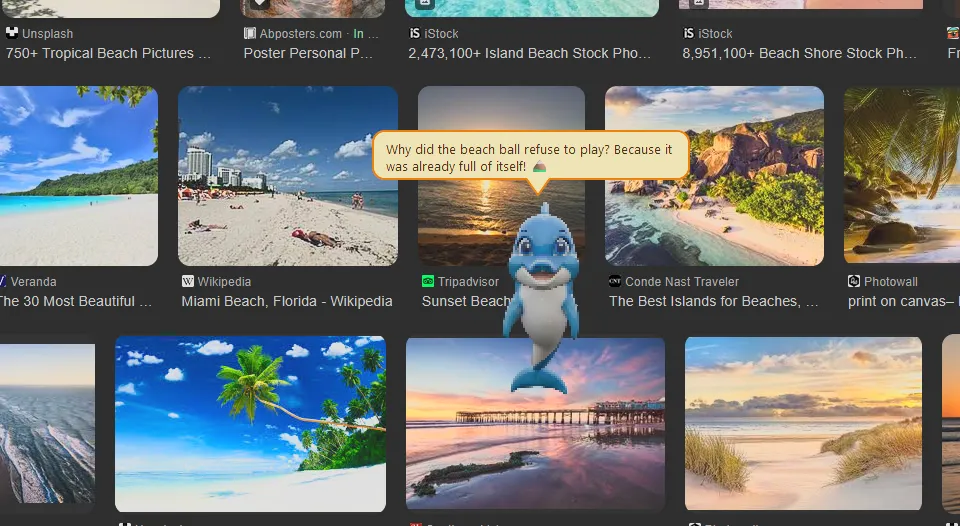
Dipsy delivers a joke as an on-screen performance instead of a plain chat reply, which is the core product idea: the assistant should feel like a character living on the desktop, not just a local model hidden behind a text box.
Architecture and runtime flow
The architecture is intentionally direct. A PySide6 shell owns the actual desktop window, chat entry, bubble UI, timers, and rendering. A controller owns decision-making. The local model provider handles runtime discovery and response generation. The parser turns model output into validated assistant turns. If the model requests an action, that request goes through an explicit registry and execution layer before anything touches the operating system.
That separation is the most important technical decision in the repo. It keeps the visible character behavior decoupled from the mechanics of model inference and desktop control, which makes the code easier to reason about and much safer to extend.
I think this matters more in a desktop companion than it would in a normal app. When software puts a character directly on the desktop, users assign intent to even small behaviors. A delayed reply, a mistimed animation, or a badly scoped action feels much more obvious than it does in a typical utility. Keeping the runtime modular helps the whole product feel deliberate instead of chaotic.
The runtime flow is also where the local-LLM experiment becomes real. A lot of local-model demos stop at “it generated text.” Dipsy goes further: the model receives event context, current session state, memory summaries, and scene opportunities, then has to return a usable turn that the rest of the system can validate and present. That turns the model from a toy chatbot into one component inside a larger interaction loop.
dipsy_dolphin/ui/       # desktop shell, character widget, bubble presentation
dipsy_dolphin/core/     # controller, session state, memory, emotion, scenes
dipsy_dolphin/llm/      # prompt contract, provider, parsing, model discovery
dipsy_dolphin/actions/  # bounded runtime actions and execution contracts
dipsy_dolphin/storage/  # local profile + memory persistence
scripts/                # packaging and release helpers
The controller is the center of gravity. It handles startup turns, onboarding, user chat, inactivity, and structured follow-up behavior while always returning a normalized result back to the UI:
class AssistantController:
    def __init__(
        self,
        brain: AssistantBrain | None = None,
        provider: ControllerProvider | None = None,
        action_executor: ActionExecutorProtocol | None = None,
    ) -> None:
        self.brain = brain or AssistantBrain()
        self.provider = provider or LocalLlamaProvider(discover_model_bundle())
        self.action_executor = action_executor or ActionExecutor()
        if not self.provider.is_available():
            raise RuntimeError(self._required_llm_message())

    def startup_turn(self, state: SessionState) -> ControllerResult:
        return self._build_result(
            "startup",
            state,
            defaults=AssistantTurn(
                animation="surprised" if not state.onboarding_complete else "talk",
                dialogue_category="onboarding" if not state.onboarding_complete else "status",
                cooldown_ms=9000,
                topic="startup",
                source="llm",
            ),
        )

    def handle_user_message(self, text: str, state: SessionState) -> ControllerResult:
        clean = text.strip()
        if not clean:
            raise ValueError("User message cannot be empty")

        return self._build_result(
            "chat",
            state,
            user_text=clean,
            defaults=AssistantTurn(
                animation="talk",
                dialogue_category="normal",
                cooldown_ms=15000,
                topic=state.last_topic or "chat",
                source="llm",
            ),
        )
I like this shape because the app remains event-driven and readable. Startup, inactivity, onboarding, and chat all flow through the same result-building path instead of fragmenting into special cases spread across the UI.
That controller shape also gave me a better way to evaluate the local model itself. Instead of asking whether a reply was merely clever, I could ask more useful questions: did it pick an appropriate animation hint, did it stay inside the dialogue contract, did it choose a reasonable topic, did it avoid repetitive behavior, and did it return something that the UI could stage cleanly? Those are much better product questions than “was the text interesting.”
The result is a runtime that feels intentionally staged and surprisingly close to something I could plausibly ship as a niche desktop product. The UI owns presentation. The controller owns orchestration. The provider owns inference. The parser owns normalization. The action layer owns execution. That clean split is what lets a whimsical character project stay understandable as it becomes more capable, and it is the reason the repo reads more like a product codebase than a pile of experiments.
Structured output and safe action handling
The local model is not trusted to produce execution-ready text. It is asked for JSON, and then that JSON is normalized into a strongly constrained assistant turn. That gives Dipsy room to feel expressive while keeping the runtime boundary explicit.
The parser does the important defensive work: validate animation names, normalize dialogue categories, clamp cooldowns, sanitize action requests, and only pass through memory or emotion updates that match the contract.
This is really the core of the local-LLM experiment. I did not want the project to “work” only in the loose demo sense where a model says something plausible and a human mentally fills in the gaps. I wanted it to work in the stricter product sense where the model returns data that the app can confidently use. That forced me to think of the LLM less as a mystical brain and more as a probabilistic component inside a typed system.
Once I framed it that way, a lot of design choices became easier. The prompt contract could be explicit. Allowed actions could be enumerated. Emotion could be a bounded payload instead of hand-wavy flavor. Memory updates could be sanitized. Cooldowns could be clamped. That discipline does not make the character less fun. It makes the fun shippable.
def parse_assistant_turn(
    payload: dict[str, object] | str,
    *,
    fallback_emotion: EmotionState | None = None,
) -> AssistantTurn:
    parsed = _coerce_payload(payload)

    say = str(parsed.get("say", "")).strip()
    animation = str(parsed.get("animation", "")).strip().lower()
    if animation and animation not in ALLOWED_ANIMATIONS:
        animation = ""

    dialogue_category = normalize_dialogue_category(
        parsed.get("dialogue_category"), fallback="normal"
    )
    scene_kind = normalize_scene_kind(parsed.get("scene_kind"))

    behavior = str(parsed.get("behavior", "")).strip().lower()
    if behavior not in ALLOWED_BEHAVIORS:
        behavior = ""

    cooldown_ms = _bounded_int(parsed.get("cooldown_ms", 12000), minimum=4000, maximum=30000)
    topic = str(parsed.get("topic", "chat")).strip().lower() or "chat"

    action_payload = parsed.get("action")
    action = None
    if isinstance(action_payload, dict):
        action = sanitize_action_request(
            str(action_payload.get("action_id", "")).strip() or None,
            action_payload.get("args") if isinstance(action_payload.get("args"), dict) else None,
        )
This is one of the most important parts of the project because it keeps the model in a planning role instead of letting it directly drive OS behavior. Dipsy can search the web, open a supported app, open a URL, or open an existing local path, but only through the bounded action system that the runtime already understands.
That structure also supports the product goal. A character app should feel surprising in presentation, not surprising in execution. Dipsy can be dramatic in what it says, but it should stay predictable in what it is allowed to do.
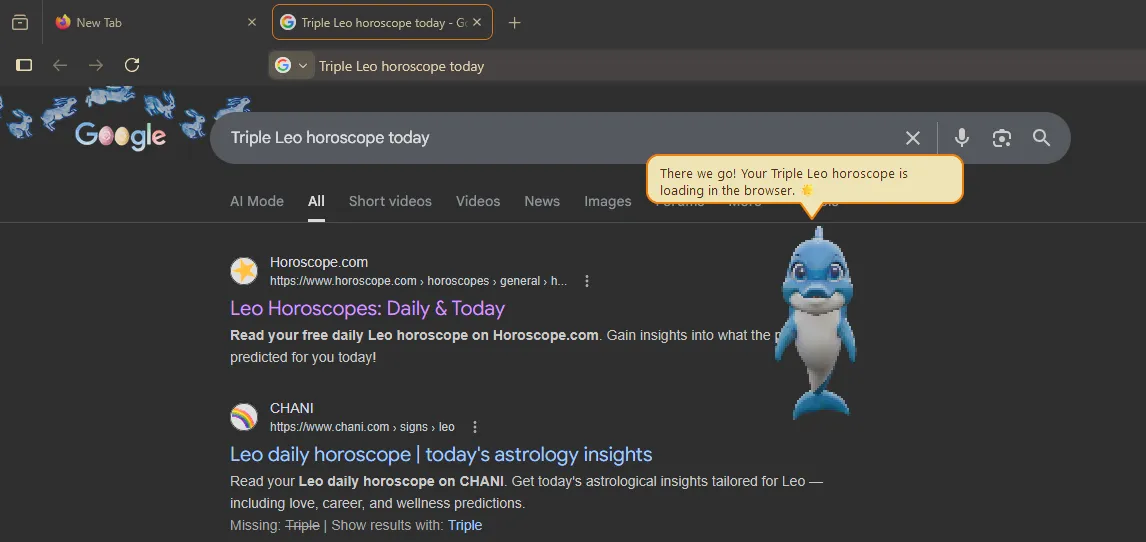
Here Dipsy turns a natural-language search request into a bounded browser action, keeping the model in the role of structured decision-maker while the runtime remains responsible for the actual desktop behavior.
That is the difference between a fun demo and a releasable feature. A demo can get away with implying capability. A product has to define capability. In Dipsy, the local model does not get to invent arbitrary tools or emit vague “I searched for that” language and hope the system sorts it out later. It has to stay inside a known contract, and the runtime has to either honor that request safely or reject it cleanly. That makes the system feel much more honest.
Rendering, packaging, and release readiness
I also wanted the project to feel like a real Windows application, not just a local script that happened to open a window. That meant committing to a packaging path, a release flow, and a visual direction that could support a polished desktop presence over time.
The rendering decision was to use PySide6 as the long-term shell and move toward sprite-based animation instead of treating an earlier lightweight shell as the permanent interface. That fits the product much better because it supports richer windowing, custom rendering, tighter presentation control, and a more expressive on-screen character.
That choice also made the local-model work more convincing. If the assistant is supposed to feel like a tiny performer living on the desktop, the presentation layer cannot feel like an afterthought. PySide6 gave the project room for actual staging: always-on-top window behavior, character rendering, speech bubble placement, dialogue timing, and animation-state transitions that make the assistant feel embodied instead of abstract.
The sprite-based direction matters for the same reason. I was not trying to build a generic chatbot with a decorative avatar. I wanted the character to visibly react to what the local model decided. Jokes should feel different from idle thoughts. Onboarding should feel different from a status beat. A successful action should land differently from a silent inactivity moment. Those distinctions are small in code, but they matter a lot in the product.
On the release side, the packaging helpers make the repo feel much more durable. The build script resolves packaging assets, writes version metadata, validates expected release artifacts, and keeps outputs under .artifacts/ instead of scattering them through the repo root.
PACKAGING_ROOT = REPO_ROOT / "packaging" / "windows"
PACKAGING_ASSETS_ROOT = PACKAGING_ROOT / "assets"
ARTIFACTS_ROOT = REPO_ROOT / ".artifacts" / "windows"
APP_BUNDLE_PATH = PYINSTALLER_DIST_PATH / "DipsyDolphin"
INSTALLER_OUT_DIR = ARTIFACTS_ROOT / "installer"
APP_NAME = "Dipsy Dolphin"
APP_EXE_NAME = "DipsyDolphin.exe"


def resolve_packaging_assets(packaging_assets_root: Path = PACKAGING_ASSETS_ROOT) -> PackagingAssets:
    app_icon_path = packaging_assets_root / "app.ico"
    if not app_icon_path.exists():
        raise RuntimeError(
            f"Windows app icon is missing at {app_icon_path}. "
            "Add packaging/windows/assets/app.ico before packaging."
        )

    wizard_image_path = packaging_assets_root / "wizard-image.bmp"
    wizard_small_image_path = packaging_assets_root / "wizard-small.bmp"
    return PackagingAssets(
        app_icon_path=app_icon_path,
        wizard_image_path=wizard_image_path if wizard_image_path.exists() else None,
        wizard_small_image_path=(
            wizard_small_image_path if wizard_small_image_path.exists() else None
        ),
    )
That tooling matters because Dipsy is the kind of project that benefits from being installable and self-contained. A desktop assistant is partly a product design problem, but it is also a delivery problem. If local model setup, runtime packaging, and installer output are brittle, the whole illusion breaks.
I also think release readiness is part of the actual research value of the project. It is easy to overestimate what local LLMs can do when everything is running inside a hand-tuned dev environment. It is much more revealing to package the app, define the runtime expectations, bundle the model path, and make the install story explicit. Once you do that, you stop thinking in terms of impressive one-off outputs and start thinking in terms of repeatable behavior.
That shift in thinking is probably the biggest lesson from the project as a whole. The interesting question is not whether a local model can say something entertaining or useful once. The interesting question is whether it can support a whole product loop: startup, onboarding, memory, idle presence, user prompts, constrained actions, visual feedback, and packaging expectations. Dipsy is my attempt to answer that question with an actual system instead of a concept deck.
Testing, constraints, and why the project matters
The testing story is another reason I like this repo. The test suite is not there to chase coverage for its own sake. It is focused on the contracts that actually matter: controller behavior, structured output parsing, packaging helpers, profile persistence, animation state rules, and presentation coordination. That matches the architecture well because the highest-risk parts of the app are exactly the places where state, model output, and UI behavior intersect.
That testing emphasis says a lot about the project itself. Dipsy is not interesting just because it has a personality. It is interesting because it tries to turn that personality into a reliable local product. The value of the codebase is not merely that it can generate funny lines. The value is that it can coordinate model output, UI presentation, memory, bounded actions, and packaging in a way that still feels coherent from the user’s point of view.
At a higher level, Dipsy Dolphin gave me a practical answer to the question that started the whole thing. Local LLMs are already good enough to power a narrow, personality-rich desktop companion when the rest of the system is designed carefully around them. They are not good enough to be trusted blindly, and they do not become good product components by accident. But when they are given structure, guardrails, and a visible role inside the UI, they become much more useful than a simple novelty demo.
For me, Dipsy Dolphin is a good example of the kind of software I like building: playful on the surface, disciplined underneath, and opinionated about where the real complexity belongs. It is a character project, but it is also a systems design project about how to make AI-driven software feel alive without making it vague or unsafe.
It is also one of the clearest explorations I have done of the gap between “LLM capability” and “product capability.” Dipsy works best when that gap is acknowledged instead of hidden. The model contributes interpretation, tone, and structured intent. The app contributes state, validation, timing, rendering, safety boundaries, and actual product shape. That division of labor is the reason the project feels grounded, and it is the main lesson I would carry into any future local-first assistant work.